Choose the right kind of width
The active-picture width is calculated from the diagonal and aspect ratio. The outer width includes the housing. They are not interchangeable. When you have a real monitor, use a measured outer width or the manufacturer’s current chassis dimensions.
The desk planner offers two input modes. Measured outer width uses each entered value as the complete horizontal span. Active-panel estimate adds an editable bezel allowance to the left and right of every entered active width. That allowance is your estimate, not a measured product property.
Mixing one outer width with another active width under a single input mode creates an inconsistent plan. If your measurements are mixed, convert them to a common basis before using the tool.
Add screens, gaps and reserves in order
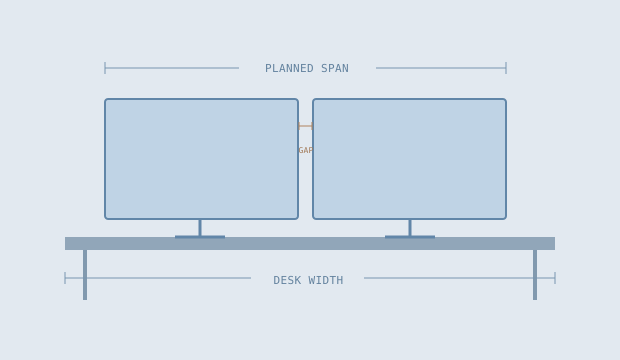
For two example outer widths of 24.2 inches, the screens total 48.4 inches. Add one 1 inch inter-screen gap and 2 inches of reserved space at each end: 48.4 + 1 + 4 = 53.4 inches of planned span.
On a 60 inch desk, the remaining width in that budget is 6.6 inches. It is not an automatic recommendation for where to put the monitors. A one-screen plan has no inter-screen gap. A three-screen plan has two gaps.
If those same 24.2 inch inputs were active widths and you chose a 0.25 inch bezel allowance per side, each estimated outer width would become 24.7 inches. The planned span would rise to 54.4 inches. Keeping the measurement mode visible prevents this extra material from disappearing from the calculation.
Keep an overrun visible
A negative remaining width means the entered plan is wider than the entered desk budget. The tool reports the overrun and expands its schematic to show the complete span. It does not crop the drawing at the desk edge and make the problem look smaller.
For example, three 24.2 inch outer widths, two 1 inch gaps and 2 inch reserves at both ends need 78.6 inches. Relative to a 60 inch desk, the budget is exceeded by 18.6 inches.
It means only that the entered front-view span is within the entered width. It is not approval to overhang equipment or a guarantee that a stand, arm or desk can support it.
Record the dimensions this sketch cannot decide
Check desk depth, stand footprint, height range, cable access, arm reach, clamp compatibility and the equipment’s stated support requirements separately. The planner does not calculate loads or provide mounting instructions.
It models flat rectangles in one straight row viewed from the front. Angled or curved arrangements require a different physical layout, and stand bases can occupy space that is not visible in a screen-only front view. A product drawing or a simple full-size paper layout can help you inspect those details.
Keep the original measurements, their units and their source next to the plan. When you change units in the calculator, the physical lengths are converted together. When you change the actual equipment, update the underlying measurements rather than just changing a diagonal label.
References & further reading
These primary references explain the terms used here. The geometry, examples and illustrations are our own explanatory work.