Start with a right triangle
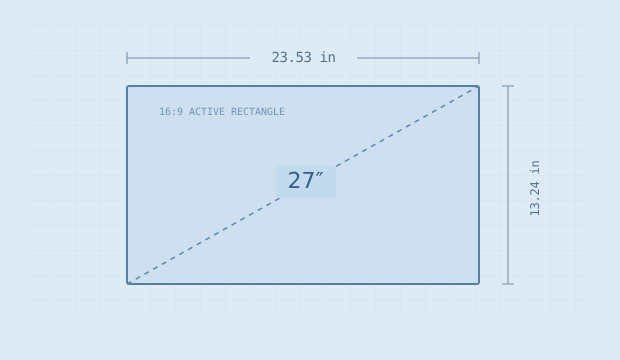
A flat rectangular active picture has a width, a height and a diagonal. These form a right triangle, so width² + height² = diagonal². An aspect ratio tells us how the width relates to the height. With a ratio of 16:9, imagine the sides as 16 equal units and 9 equal units.
The ratio diagonal is √(16² + 9²), or about 18.36 units. A 27 inch diagonal therefore has a width of 27 × 16 ÷ 18.36 = 23.53 inches and a height of 13.24 inches. Multiply those two physical dimensions to get about 311.50 square inches of active picture.
These are geometric estimates from the entered numbers, rounded for display. They are not measurements of a named product. A manufacturer’s actual viewable dimensions are the better input when you need a precise measurement.
Changing the shape changes the result
Two screens can share the same diagonal without sharing the same width or height. Stretching a rectangle wider while keeping its diagonal fixed makes it shorter. A very wide rectangle can therefore have a larger width and a smaller area than a less wide screen with the same diagonal.
For a direct comparison, use the same units and calculate each active rectangle separately. Looking only at the diagonal percentage hides the shape change. Width is useful for a desk-width check; height is useful when comparing the vertical span of a document. Area describes the total active rectangle, but it does not tell you how software will arrange its windows.
How wide is the active picture? How much active area is there? How wide is the complete monitor? A single diagonal cannot answer all three.
The active picture is not the complete monitor
A bezel and housing add material outside the viewable rectangle. A stand adds a base and a height range. The screen-size calculator does not add those dimensions automatically because their size depends on the product.
As an example of how technical documents separate the numbers, Dell’s P2418HZ specification sheet lists the viewable image diagonal separately from dimensions with a stand. That distinction is the point of the reference; this note is not recommending that model or treating its older specifications as a current buying guide.
For an actual desk plan, measure the outer width or use the manufacturer’s current chassis dimensions. Then record stand depth, stand height and any arm or clamp requirements separately. Our desk planner is a front-view width budget and cannot certify a complete setup.
Change units without changing the screen
One inch is 2.54 centimeters. A 27 inch diagonal is therefore 68.58 centimeters, and the 23.53 inch estimated active width is approximately 59.77 centimeters. The physical object is the same.
In the tools, changing the length unit converts your existing measurements. It does not replace the diagonal with a similarly named product size. Pixel counts are counts and do not change when the physical length unit changes. Pixel density remains expressed in pixels per inch so that comparisons use the same basis.
Before buying, save the geometry estimate and compare it with the actual product drawing. A clear separation between active image, chassis and support hardware is more useful than an extra decimal place on the diagonal.
References & further reading
These primary references explain the terms used here. The geometry, examples and illustrations are our own explanatory work.