Start with the sheet you can actually use
Record the stock’s full width and height, then choose an edge margin. A 297 × 420 mm sheet with a 10 mm margin on every edge leaves 277 × 400 mm of usable space. Both sides of each dimension lose a margin, so subtract twice the entered amount.
An edge margin is not the same thing as the gap between pieces. The margin reserves the perimeter. The gap reserves space inside the layout. You may use that space for a cut, handling or a separate finishing step; this tool does not decide what allowance your equipment needs.
Start with the real dimensions from your stock and process. The default measurements are an example. A printer’s printable region, a cutter’s reach and a particular paper’s behavior may impose additional constraints.
Count pieces across and down
For a uniform grid, each piece needs its width, followed by a gap except after the last piece in the row. That leads to the count formula: floor((usable width + gap) ÷ (piece width + gap)). Apply the equivalent formula to the height, then multiply the two whole-number counts.
With 90 × 50 mm pieces, 3 mm gaps and 277 × 400 mm of usable space, the original orientation fits floor(280 ÷ 93) = three columns and floor(403 ÷ 53) = seven rows. The result is 21 pieces per sheet.
The extra gap in the numerator does not add a real gap outside the usable region. It corrects the arithmetic because three pieces require only two gaps between them.
Compare a second grid, without promising perfect nesting
Rotate every piece by 90°. The same example now fits five columns and four rows, giving 20 pieces. The planner selects 21 because it is the larger of these two uniform-grid counts. When both counts match, it keeps the original orientation.
A mixture of rotations could sometimes fit more pieces. This first version does not search that problem, model irregular shapes or calculate a guillotine cutting sequence. It also does not know the grain direction or which edges must remain aligned. “Best uniform grid” is deliberately narrower than “optimal cutting layout.”
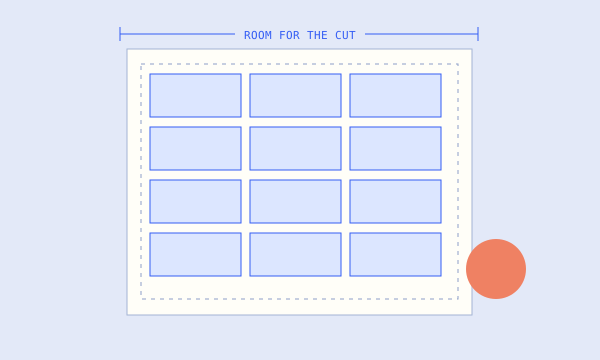
The diagram shows positions and spacing. It does not prove that your cutter can execute the cuts in the order you intend.
Turn the plan into a small order estimate
For 100 pieces at 21 per sheet, round 100 ÷ 21 up to five sheets. That supplies 105 planned positions before any test sheets or spoilage. Add those needs separately rather than silently treating every theoretical position as a usable finished piece.
The utilization percentage is finished-piece area divided by full sheet area. It is not the percentage of every offcut that you can reuse. Margins, gaps and geometry all contribute to the remaining area.
The downloadable SVG records the selected grid at the entered physical dimensions. Printer dialogs can still scale it, and very dense diagrams show only the first 500 positions. Check the SVG title, verify a known dimension at 100% output, and test one sheet before committing the full stock.