Write down actual dimensions
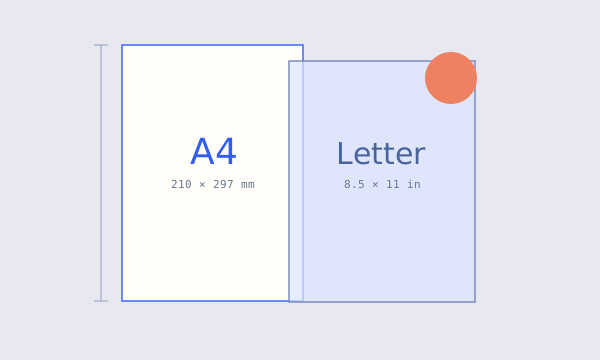
HP’s standard paper-size reference lists A4 as 210 × 297 mm and A3 as 297 × 420 mm. US Letter is 8.5 × 11 inches, or 215.9 × 279.4 mm using the inch conversion. These rectangles have different proportions.
Our sheet planner starts with A3 dimensions as an editable example; the weight calculator starts with A4. You can enter custom stock dimensions directly. The tools do not silently change a custom width when you change another field.
Keep orientation explicit. Turning a page swaps width and height, but it does not change its area. The cutting planner compares both orientations of the piece within the same sheet.
Fit and fill answer different layout questions
Suppose you place a 200 × 200 mm square inside an A4 sheet. Before considering margins, fitting every part of the square allows a scale no greater than min(210 ÷ 200, 297 ÷ 200) = 1.05. At that scale, it becomes 210 × 210 mm with spare height.
Filling the entire A4 rectangle with that square requires max(210 ÷ 200, 297 ÷ 200) = 1.485. The square becomes 297 × 297 mm; some width falls outside the page unless the image is cropped. Stretching width and height independently would distort the square instead.
These are geometric examples, not a promise that a particular printer can print to every sheet edge.
Physical sheet size is not printable area
Many workflows reserve some perimeter for printing, cutting or handling. A 10 mm margin on every edge of A4 leaves 190 × 277 mm for the planner. The right margin value depends on your actual equipment and process; there is no universal hardware setting encoded in the default.
When a dialog says “fit to printable area,” its scaling target may be smaller than the nominal page. That can reduce a carefully calculated piece without changing the page size listed elsewhere.
Compare the intended physical dimension with a ruler on a sample. A scale bar or a known-width test rectangle is often easier to verify than a page name alone.
Keep a short production note
Record stock dimensions, orientation, edge margin, cut gap and desired finished-piece size. Then note which application or printer setting controls output scaling. Use consistent units and keep your original measurements.
Our downloadable cutting SVG includes physical width and height attributes and a matching coordinate system. It is a layout reference, not an override for a print dialog that chooses its own scaling.
For repeat work, save the confirmed values and the date of the sample. If the stock or equipment changes, check the setup again rather than assuming a previous fit setting still means the same physical result.
References & further reading
Product documentation supplies context. The examples and calculator explanations are original to this site.